MARKETPLACENow in the Home Assistant Marketplace: installed in a few clicks→
Version 0.10 is out

PlugwhenPlugwhen

Your car is ready when you leave. Without a power peak.

Plugwhen learns when your car leaves and how far it drives. It plans the charging: the sun first, only the rest from the grid, for several days at once if you like. In the evening it warns you if the car will not be ready.

any car, any wallbox with or without solar runs in your Home Assistant
Tomorrow, 7:00
Example
Readyfor departure
136 kmrange needed
45 %target charge
03:00 – 07:00 · 5.4 kWh · spread, no peak
19:00 · Please plug in: 5.4 kWh are missing by 07:00.
Animation with example values · sound on in the player
Why

The car is the biggest load in the house

When it charges is usually luck: you plug in when you get home. Plugwhen turns that into a plan.

Learns your week

From the history of your car: when it leaves and how far it drives. No form to fill in.

Sun first, the rest from the grid

First what the solar forecast promises while the car is at home. Only the rest comes from the grid: spread at low power where peaks cost money, below your peak limit.

Plug in less often

If you like, Plugwhen charges for the next days at once, up to an everyday limit of 80 %. Your reserve is left after the trip.

Warns you in time

In the evening, on your phone, once per departure: please plug in, otherwise the car will not be ready.

What it looks like

Charts instead of tables

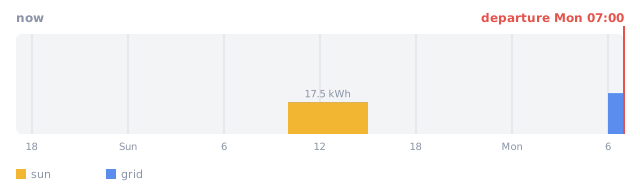
The charge plan until departure
yellow = sun, blue = grid, red line = departure (example data)
Charge plan as a timeline from now to the departure
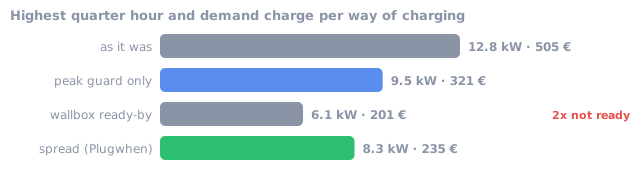
What it would bring in your house
calculated from your own history, an estimate (example data)
Highest quarter hour and demand charge per way of charging
Together

Plugwhen plans, the Wächter guards

Each works alone. Together they know about each other.

Plugwhen

plans the car
  • knows when the car leaves
  • plans when it charges
  • warns you if it will not be ready
  • checks before every departure that it is on track, and if you allow it, switches the wallbox to "charge now"
  • charges for several days at once, the reserve is left after the trip
  • optionally charges to 100 % once a week
←peak limit
→charge plan

Viertelstunden-Wächter

guards the peak
  • keeps every quarter hour below your limit
  • throttles the wallbox when needed
  • has the last word on peaks

Do you use evcc? Plugwhen writes its plan into evcc, and evcc charges. How they work together →

Good to know

What you need, and what it costs

Install

Install from the Marketplace

  1. 1Settings → Marketplace: search for Plugwhen and download it (before Home Assistant 2026.11: HACS).
  2. 2Restart Home Assistant and add the integration.
  3. 3The set-up finds evcc and the Wächter by itself and proposes your car. Check it and save.
  4. 4Leave the car in Learn for about two weeks and look at the plans.

Open in the Marketplace ↗ · Documentation ↗ · GitHub ↗

Questions

Charging with the sun: short answers

How do I charge my EV with solar surplus in Home Assistant?

Install Plugwhen and link your car and wallbox (or evcc). What the solar forecast promises while the car is at home and plugged in is left to the sun; only the rest comes from the grid, placed after the sun hours, so the car is ready at departure anyway. More: charging with solar surplus

Do I need evcc?

No. Plugwhen can switch the wallbox itself. If you run evcc, Plugwhen hands its plan to evcc and evcc stays in charge of the wallbox.

How does Plugwhen know when I leave?

It learns from your trips: when the car usually leaves on each weekday and how much it needs. A calendar for trips is optional.

Do I have to plug in every day?

No. From version 0.10 Plugwhen charges for several days at once (default 3) up to an everyday limit (default 80 %). Replayed with 255 real days of one car: 3.2 charges a week instead of 5.6.

Does charging the car drive up my grid peak?

Not with the Viertelstunden-Wächter: it keeps every quarter hour of the house below your limit, and Plugwhen plans the charging below that limit.

What does it cost?

Nothing. Plugwhen is open source and is installed through the Home Assistant Marketplace (HACS).

Does my data leave the house?

Only if you switch on sharing, and then anonymously. Without it everything stays in your Home Assistant.

Questions or feedback?

Write to me. Feedback from the first users helps most right now.